In this quick tutorial we use dc3dd to create a raw image of a drive.
dc3dd was developed at the U.S. Department of Defense Cyber Crime Center (DC3). It is a patched version of GNU dd with extra features for computer forensics and, since it is built on dd’s code, it follows dd’s development. Its most useful feature is on-the-fly hashing with multiple algorithms (MD5, SHA-1, SHA-256 and SHA-512): the image and its hash are produced in a single pass.
1. Identify the source drive
Connect the drive to your forensic workstation (through a write blocker, if you have one) and list the disks:
sudo fdisk -lThe output will look like the screenshot below. In this example the device to acquire, marked with a yellow arrow, is /dev/sdc1.
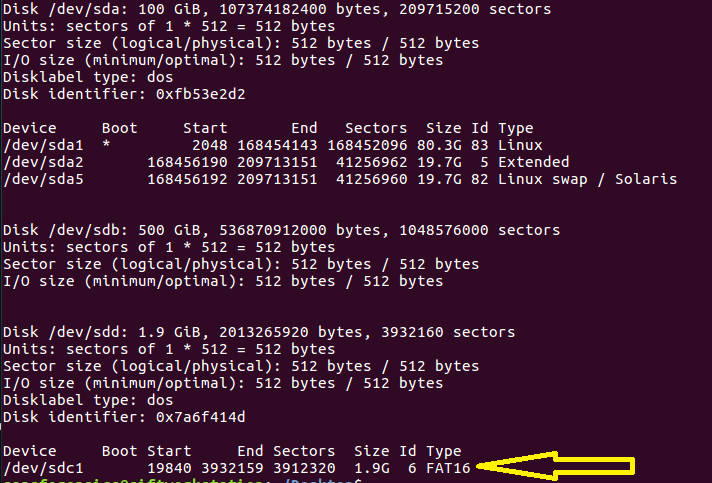
fdisk -lHere we image a single partition of a USB stick. To capture the whole drive, including the partition table and unallocated space, use the device itself (/dev/sdc) instead.
2. Run dc3dd
sudo dc3dd if=/dev/sdc1 of=usb1_evidence_image.img hash=sha256 log=usb1_evidence.logif=/dev/sdc1— input: the source deviceof=usb1_evidence_image.img— output: the image filehash=sha256— on-the-fly hashing algorithmlog=usb1_evidence.log— path of the log file
While it runs, dc3dd shows its progress:

3. Check the image and the log
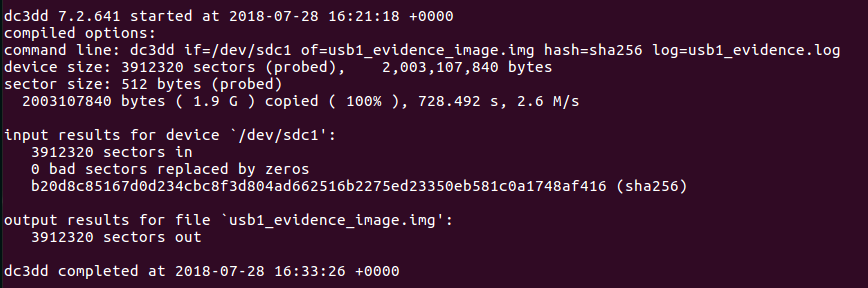
When dc3dd finishes, you will find the image at the path given with of= and the log file at the path given with log=. The log contains the same output you saw on screen, including the hash computed for the image: keep it with your case notes. Here is an example:
Working with a failing drive? dc3dd writes zeros in place of unreadable sectors, which keeps the image consistent but loses that data; for damaged media, ddrescue is a better first pass.
For a side-by-side comparison of dd, dc3dd and dcfldd, see Forensic imaging with dd, dc3dd and dcfldd.


Leave a Reply